“Beech Hill Roots” book: Descendants of William and Elizabeth Ward, Nova Scotia
Along with identifying the descendants of this couple, there are notes, pictures and an extensive index. Over 40 years of personal interviews by countless researchers and individual families who contributed. Publicly available and private collections were consulted.
Who is in the book? This 5 volume set of books contains 2,776 pages and is not just for the Ward or Bishop families! At last count, there were 15,335 direct descendants in 11 generations. The final database numbered in excess of 30,000 individuals.
The 500 page Index (Book 5) is unique even in the genealogy world to allow more success in looking up names. Married women are listed twice, with their maiden and married surnames. Parents of spouses are shown. Special Appendices precede the index to provide additional, useful information, such as descriptive place name information and maps.
The Register format of Beech Hill Roots allows the reader to follow their roots back to the original family. William and Elizabeth (Flintoff) Ward who came to Beech Hill in 1774 with 18 month old Moses. New research reveals Elizabeth’s real name was Flintoff, not Grant as commonly assumed.
Beech Hill Roots leaves a legacy of family history from Kings County, Nova Scotia that spans the continent, especially for anyone having ancestry in Kings County. Generations to come may find links to their past before it is faded from memory.

Palm trees near the lake in the Sahara Desert, Morocco
It seems to me there are a few types of Open Source Software (OSS) contributors.
- The corporate employee whose employer uses OSS, and will gladly pay him/her a salary to contribute and enhance the software. Particularly to implement features required by the company. Ex: Red Hat; Linus Torvalds/TransMeta.
- The consultant who gives away free software, but charges for consulting and customization (WiX), or an enhanced “professional” version.
- The employee of a non-profit organization that receives donations (Electronic Frontier Foundation, Apache Foundation), or an academic paid by a university.
- The hobbyist who toils at a boring day job, but who likes to tinker evenings and week-ends.
- Government software funded by taxpayers (NIST; USGS).
- A programmer or organization funded by KickStarter or Patreon.
- Operating Systems: Linux, FreeBSD.
- Web browsers: FireFox.
- Web servers: Apache.
- Software development tools: GNU, GCC, Eclipse.
- Common applications: Open Office word processing + spreadsheet; Gimp and InkScape graphics; TeX document formatting; Thunderbird email.
- Emulators: Wine.
- Genealogy: Gramps. (Very few people use it, consumers would rather pay for something simple to install and use).
The new 2019 edition of Family Tree Maker introduces exciting features, including the option to assign up to four colors to people in your family tree. You can color each branch of your ancestors, or lines of descendants, or by place of origin.
FTM 2019 was released last month.
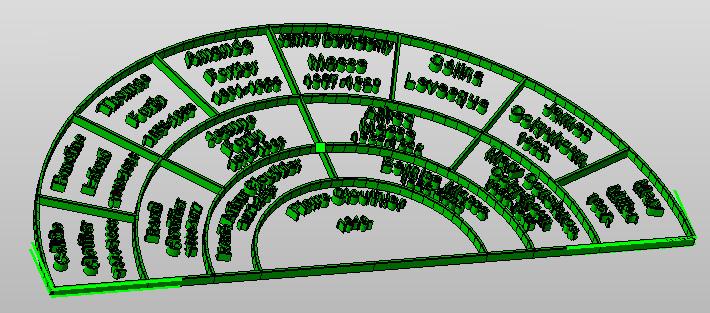
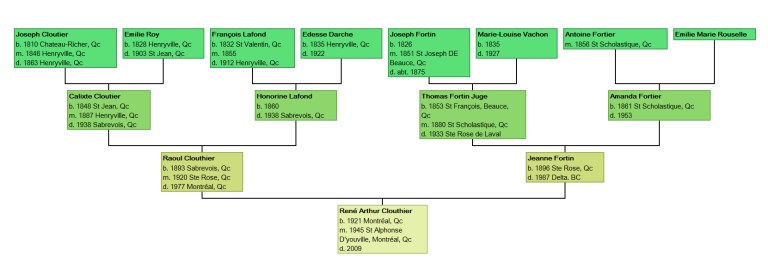
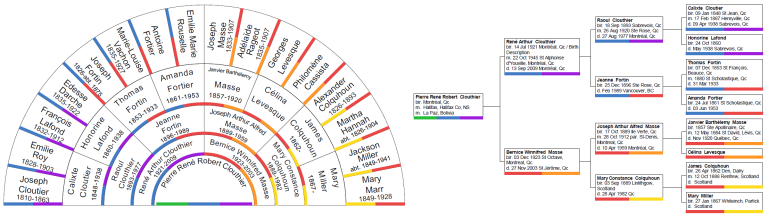
Charting Companion fully supports the display of the FTM colors, in the Ancestor, Descendant, Hourglass, Bowtie, Fractal, Dandelion and Fan charts. Only Charting Companion can offer you complete display of your FTM colors.
![]() |
| FTM 2017 colors displayed in Charting Companion charts (click to enlarge) |
The use of colors in FTM 2019 is limited only by your imagination. Use Charting Companion to display your FTM 2019 colors!

Trellis chart
One of the innovations Progeny has introduced to genealogy is the Trellis chart, “the chart with everyone in it”.
Mini-Trellis
The Trellis chart is a brand new way to tell the story of your family. It shows everyone in your family, in a way that no traditional box chart can do.
Based on research by a group of scientists, the Trellis is a diagonally-filled matrix, where rows are individuals and columns are nuclear families. Click here for more information.
The Trellis allows for interactive investigation of your family tree. With one click, you can highlight all the ancestors and descendants of an individual. Click a second person and you can see where their pedigrees intersect in a colorful display. Collapse the tree for a condensed view. Navigate up and down the tree with a simple click.
Charting Companion with the Trellis is available for all genealogy programs.
The new 2017 edition of Family Tree Maker introduces exciting features, including the option to assign up to four colors to people in your family tree. You can color each branch of your ancestors, or lines of descendants, or by place of origin.
FTM 2017 is undergoing final testing, and will be available soon.
Charting Companion fully supports the display of the FTM colors, in the Ancestor, Descendant, Hourglass, Bowtie, Fractal, Dandelion and Fan charts. Only Charting Companion can offer you complete display of your FTM colors.
Family Tree Maker colors displayed by Charting Companion (click to enlarge)
The use of colors in FTM 2017 is limited only by your imagination. Be ready with Charting Companion when FTM 2017 hits the street!
I discovered the most original and attractive way to tell the story of your family at RootsTech this year: a graphic novel, or comic book.
Il Museo del Cognome (the Museum of Family Names) can translate your family history into a vibrant and inspiring comic book. The Museo describes it best:
How many times have you tried to imagine your ancestors faces, habits and the places where they were born? …the way of living of your forebears, their emotional bond with the homeland and the people with whom they surrounded themselves.
Have you ever walked through the narrow alleys, visited the churches where they went to pray, seen a rusty sign of an old small shop, rummaged in the cardboard box looking for photographs, letters, family memories? These are the things that bring your roots back to life.
![]() |
| Passengers on the MS Vulcania, ca. 1926 |
Send the Museo a description of some important family events, with photos if you have them, and the Museo will turn your narrative into an exciting comic-book strip that you can share with your family. Imagine the delight in the children’s eyes as their ancestry comes alive in a familiar and appealing format.
The stories can be published in English as well as Italian and other languages.
To live in hearts we leave behind is not to die.
Family Tree Maker has a Web Links feature:
![]() |
| Family Tree Maker Web Links |
Although FTM does not appear to publish these Web Links at the present time, Charting Companion (6.4.39 and later) can display the Web Links in any chart or report that allows selection of event types.
You can display Web Links in the Standard Family Group Record:
![]() |
| Web Links in Family Group Record |
You can display Web Links in any chart. Note that if you Publish as HTML, the Web Links are “hot” or clickable. Clicking on them will open a new browser tab to the Website. Facebook, Linked In, Twitter and Google+ links are highlighted with a special button. Click for true HTML page.
![]() |
|
| Chart with “clickable” links |
You can display Web Links in an Ancestor or Descendant Book:
![]() |
| Web Links in Ancestor or Descendant Book |
You can display Web Links in the Outline Descendant:
![]() |
| Web Links in Outline Descendant |
When creating a chart, make sure that the “WebLink” event type is included in the list of events, and that “Place Names” is checked:
To click the links in Internet Explorer, click on “Allow blocked content”.
Genelines – Timeline Charting Software

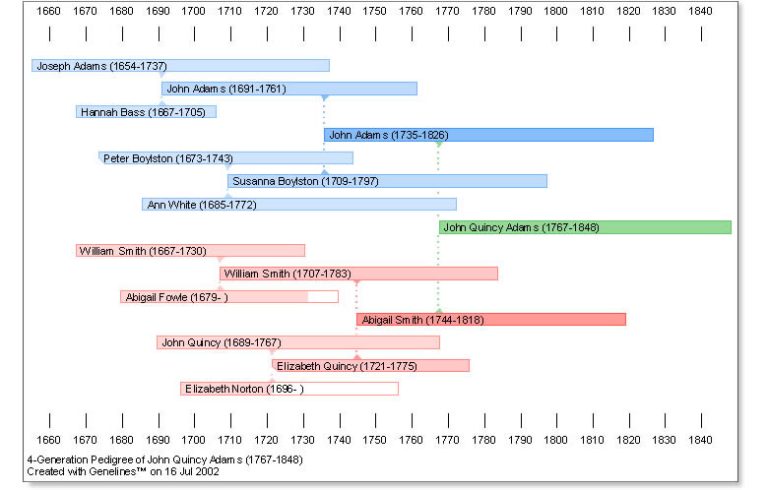
Genelines timeline Pedigree
GENELINES is one of the most powerful research and storytelling tools available to anyone researching their family tree.
By bringing together elements of time, history and family relationships on visual time line charts, Genelines (for Windows) software can bring your family tree to life. Genelines automatically reads your family tree database so you don’t need to re-enter your family information. For a complete list of compatible family tree database programs, click here. Your choice of CD-ROM or Download!http://progenygenealogy.com/products/timeline-charts/universal-version.aspx
CREATE AMAZING TIMELINE CHARTS

Genelines timeline Descendant
Genelines features a suite of seven different timeline chart formats, consisting of two BIOGRAPHICAL and five RELATIONSHIP charts.Each of these seven charts can be customized according to: timeline, historical events, personal or family events, colors and fonts. Unique in presentation, the Individual and Comparative Biographical Charts allow you to include such events as career path, relationships, place of residence, etc., and compare these life experiences with those of other relatives in your database.
You can even add historical events that were happening at different times during their lives to see how such events may have impacted the decisions they made and the directions they went.The Relationship charts let you view your family pedigrees and lines of descent against a backdrop of historical events on the local, regional or world stage.
You can customize charts according to people, line of descent or family group, personal life details, color, and the history you wish to depict.
The relationship charts can explain a great deal about your family and how they lived and even allow you to add people who are not necessarily related.
FLEXIBLE PRINTING OPTIONS
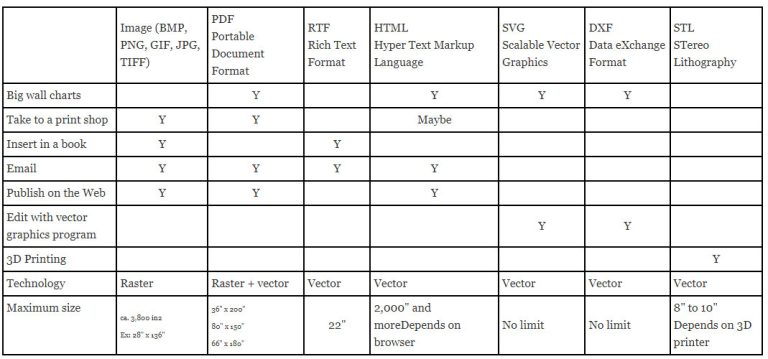
All Genelines charts can be previewed and printed in full color, in various sizes – including wall charts – or published to PDF and incorporated into a web page or shared by e-mail. The Genelines form of presentation can be much more meaningful and easier to understand than a typical text based report, and can help you draw conclusions that may otherwise have been missed.

Pedigree with Historical Events
GET YOURS TODAY
Genelines, a program that will help you:
- produce amazing timeline charts- identify missing information
- highlight illogical or contradictory data
- expose duplicate persons
- focus your research
- assist with data collection
- help you understand your data betterAn unbelievable program at an unbelievable price of $29.95 (Download)
For more information on Genelines, sample charts and research examples go to: http://progenygenealogy.com/products/timeline-charts.aspx
For more information on ordering your copy of Genelines 2.4 go to:
http://progenygenealogy.com/products/timeline-charts/universal-version.aspx
Such a valuable program at such a great price, now is the time to make it a part of your genealogy software library.
Pierre Clouthier
President, Progeny Genealogy Inc.
CHARTING COMPANION – NEW FEATURES
Children can be so wonderfully direct. We were at a parade, and my four-year old Melanie says “Give me a piggyback!”
“I’m tired” I replied.
“I’m not!”
We have recently added some enhancements to Charting Companion.
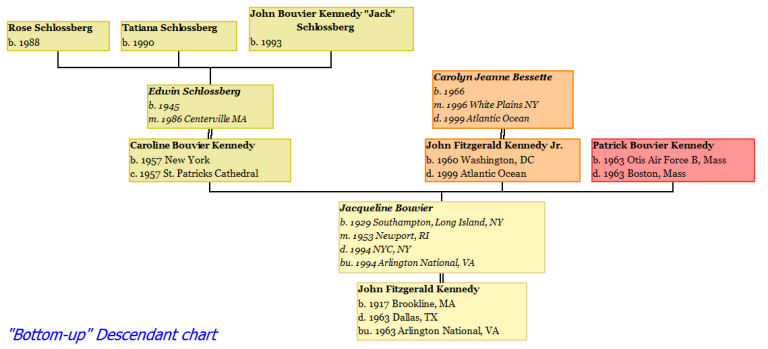
Descendant “Bottom-up”
Charting Companion can now display a Descendant chart in “Bottom-up” mode, with the Subject at the bottom, and the descendants above, like a growing tree with its branches rising upwards.
The Descendant chart also has a “no spouse” option, where the spouses are not displayed, and only the bloodline relatives appear.
Save chart as a spreadsheet.
Ancestor and
Descendant charts can be published as an Excel spreadsheet. Birth, Marriage and Death dates & places, for everyone in the chart, are saved in the spreadsheet file.
The results of a Search can also be saved as a spreadsheet, complete with a special “sort date” that enables you to see events in a timeline. You can compare a group of people and see the relationship and sequence of their events.
Charting Companion videos
Click to see some short videos that show the power of Charting Companion.
Once a month I get a call from a Search Engine Optimization (SEO) firm who stumbled upon one of my Websites. They want to optimize my SEO, improve my Website, increase traffic, yadda yadda. They can be very persistent, calling repeatedly. One outfit (EZ Marketing) impersonated phone numbers so I would not recognize them on call display.
Their proposition is simple: I give them my credit card number, they siphon $500 to $1,000 from my account every month, and in return they’ll assign some low-level grunt to learn my business in fifteen minutes, stuff my <meta> tags with keywords they’ve gleaned, and write generic link bait pages.
The problem is that there is no way of measuring the cost effectiveness of their efforts. It doesn’t make sense to spend more money on advertising, than what revenue it generates.
If my sales increase, tadaa! they’re successful. If not, too bad so sad, looks like we’ll have to do more of the same and thank you for the cash flow.
I have a counter-proposition. I will assign the consultant an Affiliate Code from my e-commerce system. The Affiliate Code will be embedded in the material they create. If their pages generate sales, they will get credit, and a commission. Ditto email.
That usually takes them aback. What? No compensation without performance? We have to measure our results? Heresy!
Like Diogenes, I’m still looking for an honest firm.
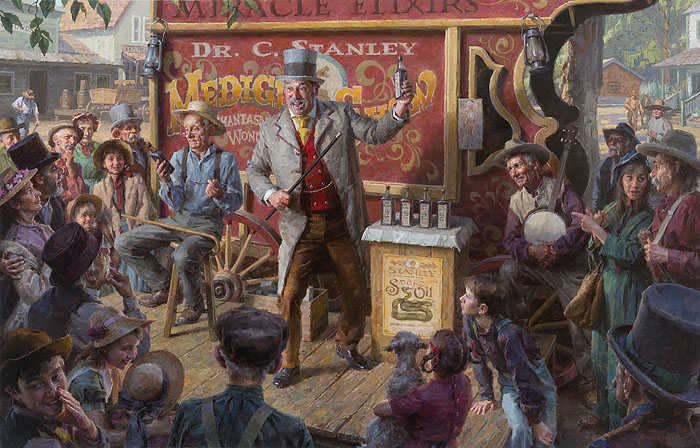
Snake oil, originally a fraudulent liniment without snake
extract, has come to refer to any product with questionable or
unverifiable quality or benefit.